Theatre Script Builder
March 2025 → June 20255 min read
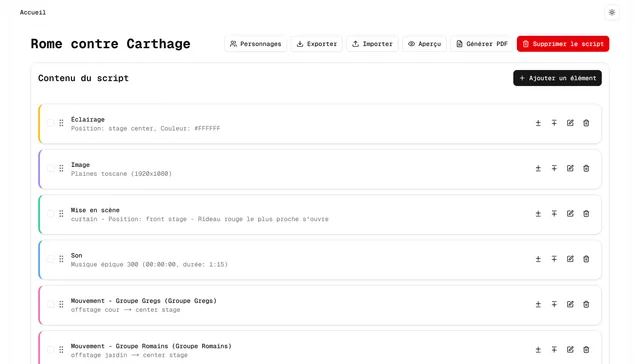
In my master’s, we had a module where we had to put on a play, to work on communication. In the end, the play was never performed, but we still worked on it and held rehearsals.
There’s more to a play than the text. Between two lines, the lights change or some music starts, and it all happens in a precise order. I wanted a tool to write all of that in sequence, in the order it happens on stage, and export it to PDF.
Theatre Script Builder is that tool. You create a script, add its characters, then stack up the elements one by one. The code is public on GitHub.
Seven kinds of elements
A script mixes dialogue, narration, lighting, sound, images, staging and movement. Each one has its own fields. A light has a spot on stage and a colour. A sound can be a file or a YouTube video, with its timecode and duration. A movement says which character goes from where to where.
A light stays on until someone switches it off, and music plays until someone stops it. To switch off or stop, you don’t type anything again. You pick from the lights and sounds started earlier in the script.
Each character has two names, the role’s and the name of the person playing it, plus a colour of their own. Both names show side by side, right down to the PDF, so you can tell at a glance who plays whom.
A single list
On the database side, these seven very different types have to fit into a single ordered list. Each element is a ScriptItem, which only holds its position and its type. Its own fields go into a separate table, one per type (Dialogue, Lighting, Sound…), linked to a single ScriptItem. You can insert any type at any position, and reading the script is just a sort by position.
Fast, and for a team
We wanted to be able to work on it together, with an intuitive interface where everything is quick. You can add an element right before or right after any other, select several to delete them at once, and reorder everything by drag and drop with dnd-kit, which also works from the keyboard.
Changes stay in the browser, in a Zustand store, until you save with the button or Ctrl+S. As long as changes are pending, an indicator says so, and the browser warns you if you close the page.
For working together, I kept it simple, with no accounts. Each script has its own address, which the whole team could open. There’s no real-time editing. Everyone saves their own changes.
Backups mattered too. A button exports the whole script to JSON, characters included, so you can keep a copy of your own. Import does the opposite and replaces a script’s content with the file’s.
The PDF and the preview
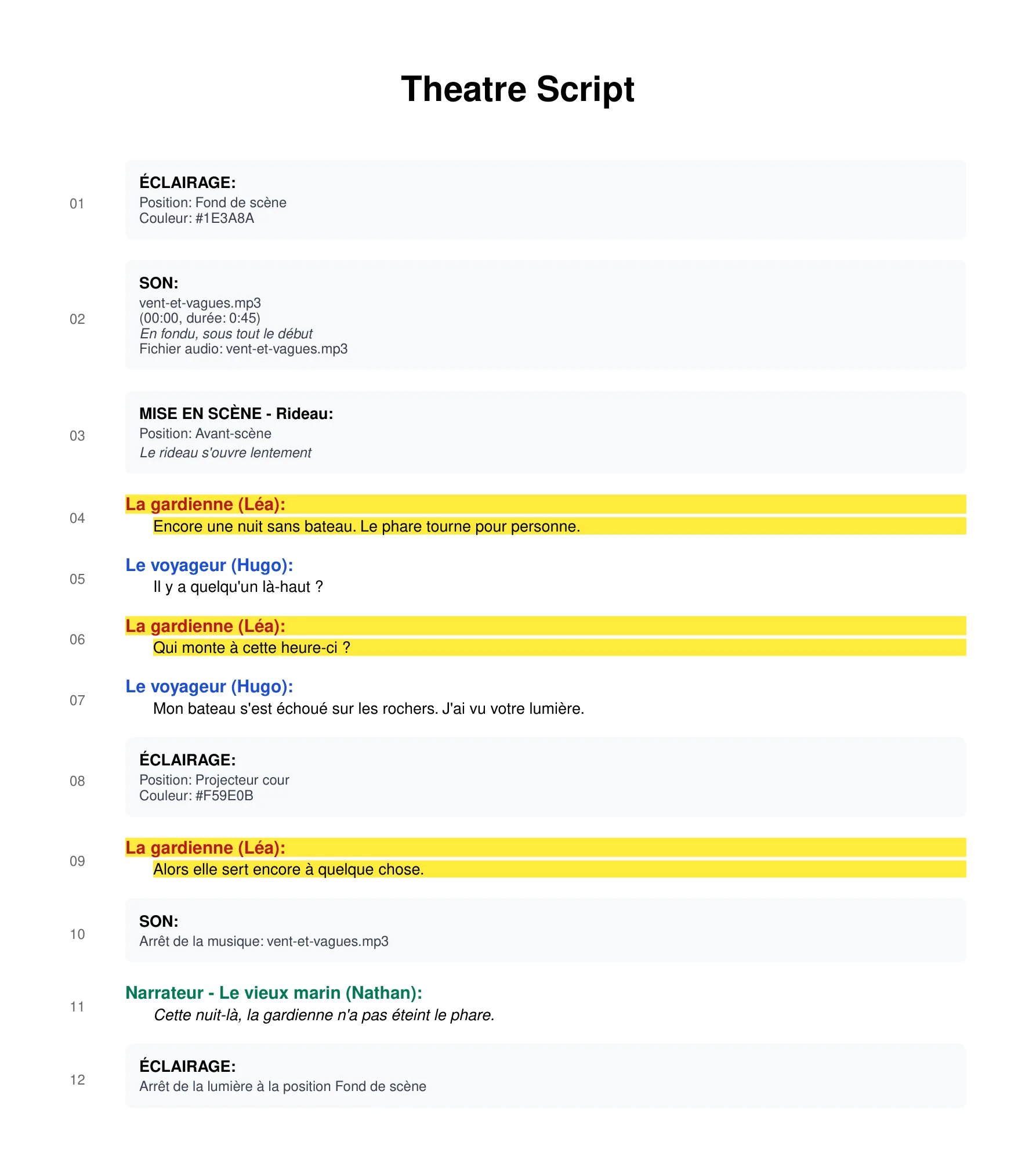
Being able to export the script to PDF was important. It’s generated in the browser with react-pdf, where the document is written as React components. Each element is numbered and never split across two pages. The character’s name is written in their colour, and technical cues come out in grey boxes, so they don’t blend into the spoken text.
Before generating, you can tick some characters and their lines come out highlighted in yellow, so an actor can quickly find theirs. You can also leave the images out.
On a small demo script in French, with the keeper ticked, it looks like this:
The preview shows the script read-only. An arrow marks the element you’re at, and you move it along with the keyboard arrows. When you come back to the page, it’s where you left it. Sounds and YouTube videos play right inside it.
On a real script
All of this worked fine on a small script. Ours ended up with nearly seven hundred elements, and that’s where I struggled, mostly with saving and sorting. To be fair, I was discovering everything at once: Next.js and its App Router, Server Actions, Prisma and a serverless Postgres database on Neon.
To save, the browser sends the list of pending changes to a Server Action. It checks the data again with Zod, then applies every change in a single transaction. The catch is that moving one element rewrites the position of every element in the script. With seven hundred elements, that’s seven hundred queries in the same transaction, each one sent to a remote database. The transactions took so long that I ended up raising their timeout to five minutes.
To limit the damage, only the latest order of the list is sent on save, however many moves you make. On the screen side, I memoised the rendering of elements, so an element only re-renders when its data changes.
Images and sounds imported as files didn’t help. They were stored straight in the database, base64-encoded, and came along with the script on every load and in every JSON export. Looking back, I’d keep them separate, in file storage.
Where the project stands
It’s one of my first complex projects, and I stopped it there because of those tech problems. In May 2025, I locked the editor so scripts could only be read, then I took the demo down.