Microsoft Reward V2
September 2024 → March 20266 min read
Code source (extension)Première version (bot)Téléchargements
Microsoft Rewards gives you points for Bing searches, quizzes and daily activities, which you then exchange for gift cards. Doing the same things every day gets repetitive, so it’s tempting to automate. I had a go at it in March 2023, mostly to practise TypeScript and have some fun.
I’d rather say it up front: I don’t recommend using this tool. Automating Microsoft Rewards goes against Microsoft’s terms of service, and I built it to learn, not to farm points. The code stays public on GitHub for anyone interested, but the project is pretty much abandoned now, and it may already have stopped working, because Bing’s interface changes without warning. That said, it’s one of the projects I’m proudest of, for the problems it forced me to solve.
The extension
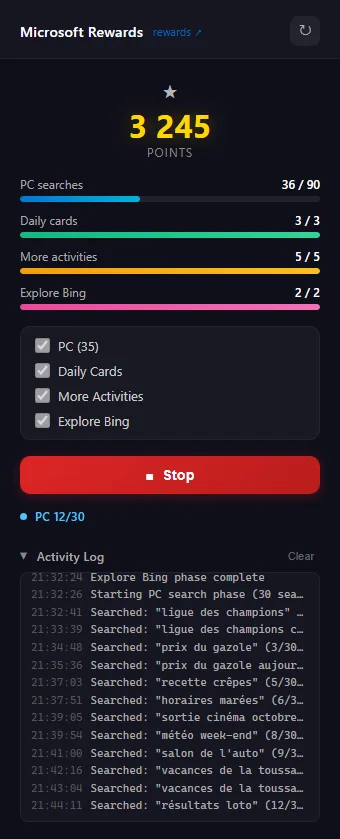
In its latest version, it’s an Edge extension. You sign in to your Microsoft account, tick the searches or activities you want done in its popup, and click Start. It works in its own tab group, you can keep browsing alongside it, and the popup shows how far along each task is, with a log of what it does. Here it is mid-run, with test data:
GitHub Actions publishes a new archive of the extension on every push to main, so it can be installed without building anything.
Three versions
It took me three versions to get there. The first, in March 2023, was a Puppeteer script that launched Edge without a window and ran the searches on its own. You had to put your email and password in a file, and turn off two-factor authentication on your account, otherwise the script couldn’t sign in. Between steps, it waited two or three seconds, then looked at the page hoping it had caught up. In the end, I hardly ever used it.
The second, one evening in September 2024, started from scratch with Bun. This time Edge opened in a real window, you signed in yourself, and no password was left lying around in a file. The script also waited for the page to finish loading and for the results to show up, instead of waiting a fixed time. After that evening, I didn’t touch it for a year and a half.
The third, in February 2026, is the extension, rewritten with Claude Code. The project’s rules live in a CLAUDE.md file that Claude reads at every session, and one of them forbids the code from storing or typing any credentials. The extension never sees a password. I’d already made a tiny extension back in 2022, for Cookie Clicker, but an extension of this size was new to me.
How it works
An extension can click in a page with ordinary JavaScript, but those clicks have isTrusted set to false, which tells the page they didn’t come from a real person. So the extension goes through the chrome.debugger API, which gives access to the developer tools’ protocol. What it types and clicks that way reaches the page just like a real gesture.
Its background code runs in a service worker, as Manifest V3 requires, and the browser can stop it as soon as it’s idle. A plain setTimeout between two searches might never fire. So each search is scheduled with an alarm (chrome.alarms), and the bot’s state is kept in chrome.storage.session, which survives those stops. The popup just listens to that state.
To know what to do, the extension queries the Microsoft Rewards API with the browser’s session. It gets the points left to earn from searches, at three points a search, and the cards not done yet. It then finds each card in the page by its identifier, data-bi-id, and clicks the middle of its link. It doesn’t answer quizzes. From what I saw while testing it, opening the card and staying on it for a few seconds is enough.
Not looking like a robot
For me, this is the most interesting part of the project. A site can spot a bot by its rhythm, so the extension types each letter with a small delay, stays on the results for a few seconds and scrolls the page with pauses, as if it were reading. Sometimes it also opens one of the top results in a separate tab, and closes it a bit later. At first, it only waited three to six seconds between two searches. In March I slowed everything down, and it now waits between twenty seconds and a minute and a half, sometimes up to three minutes.
That leaves the browser itself. A page can read navigator.webdriver, the flag of a browser driven by a program, and the extension redefines it before every page loads, in one line. I’ll stick to the principle here, I’m not going to write a how-to.
It also needed real searches, varied and current. The extension starts from the day’s Google Trends in France, then asks Google’s autocomplete for suggestions around each one, which gives a few hundred searches. If those sources don’t answer, it doesn’t start, instead of falling back on a fixed list as it did at first.
What I removed
The first version of the extension also went after the points for mobile searches, like both scripts before it. It passed Edge off as an iPhone, down to emulating a small screen and touch gestures. It worked, but it was a lot of pretending for a few extra points, and just as much code that could break overnight. I deleted all of it the same day. In March, the fake identity used for desktop searches, which announced a late-2024 version of Edge, went too.
Where the project stands
The code hasn’t changed since March 2026. Yet it’s one of the few projects where I saw it met a real need. Both repositories have a few stars, and in April a user wrote to me on GitHub to say the extension was very well made, and to ask whether it also answered quizzes. That’s nice to hear, on a project I made for fun. We started looking into why two activities announced by the API weren’t found in the page, and the issue is still open.