LicenseKit
February 2026 → July 20265 min read
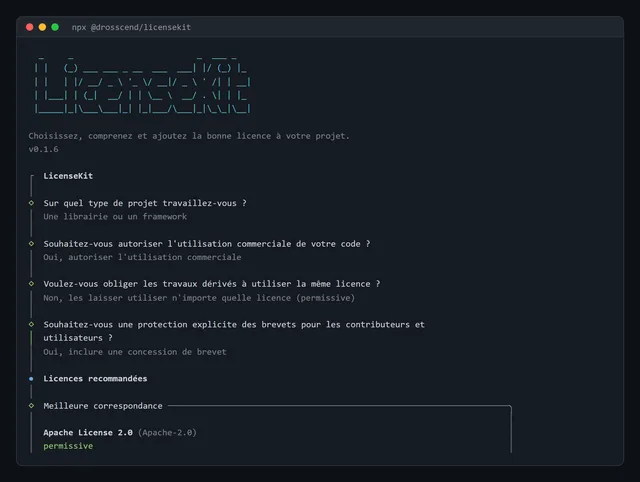
In front of an empty repository, there’s always that moment when you have to pick a licence. You vaguely know MIT is permissive and the GPL makes you do something, you copy what you saw somewhere else, and you move on. The tools I knew did generate a LICENSE file, but none of them explained what I had just signed.
There was a more personal reason too. I’ve downloaded hundreds of tools like this one, and I’d always wanted to try making one myself, something anyone could run with a single command.
That’s where LicenseKit comes from. It’s a command-line tool that helps you pick a licence, understand it and add it to your project. You can run it without installing anything:
npx @drosscend/licensekitUnderstanding before choosing
For each licence, the tool tells you what it permits, what it requires and what it excludes, in a few words rather than in legalese. For MIT, with info mit, it looks like this:
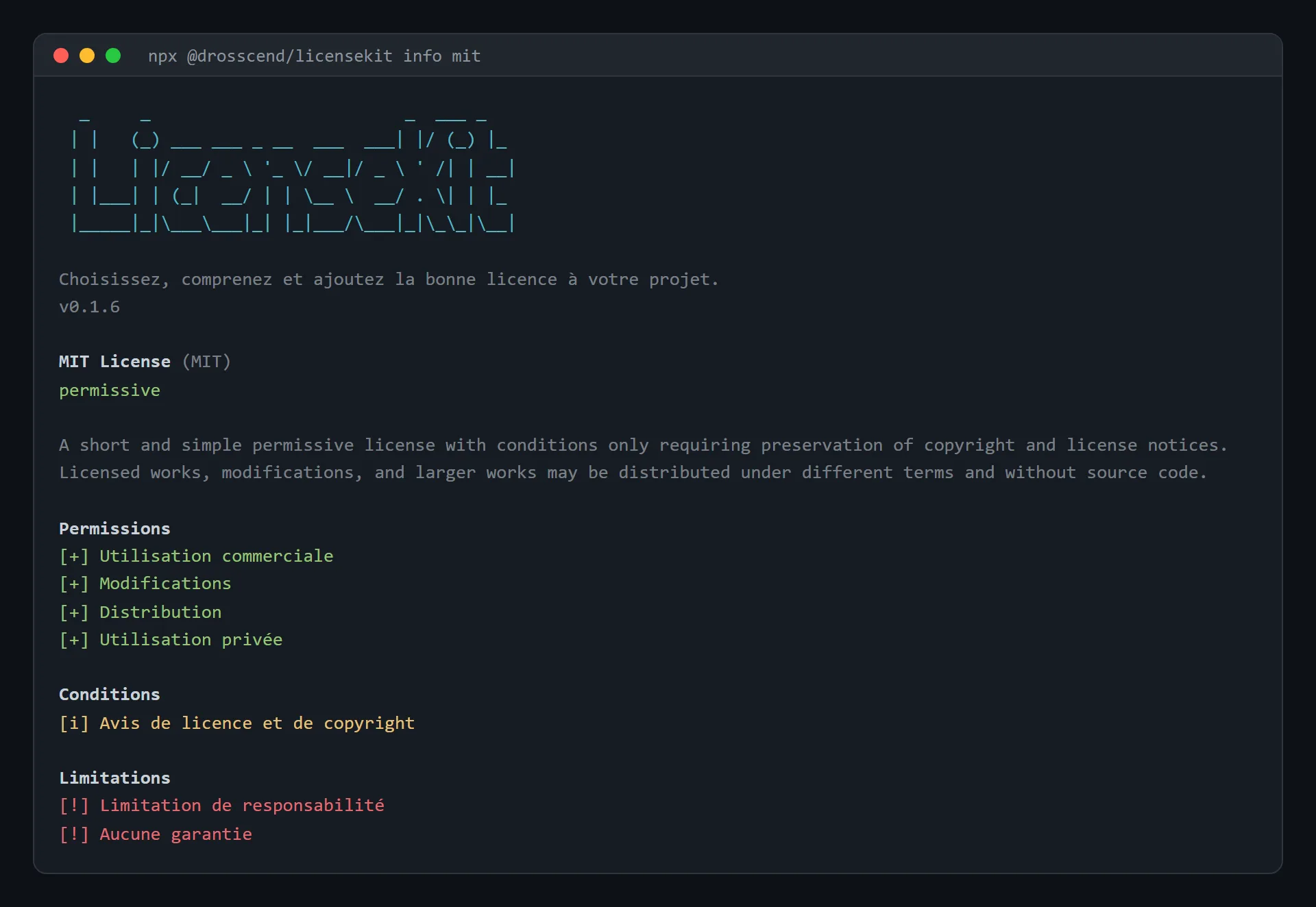
The interface speaks French or English, depending on the system language or the --lang option, which is why this capture is in French. Only the licence summary stays in English, as GitHub provides it.
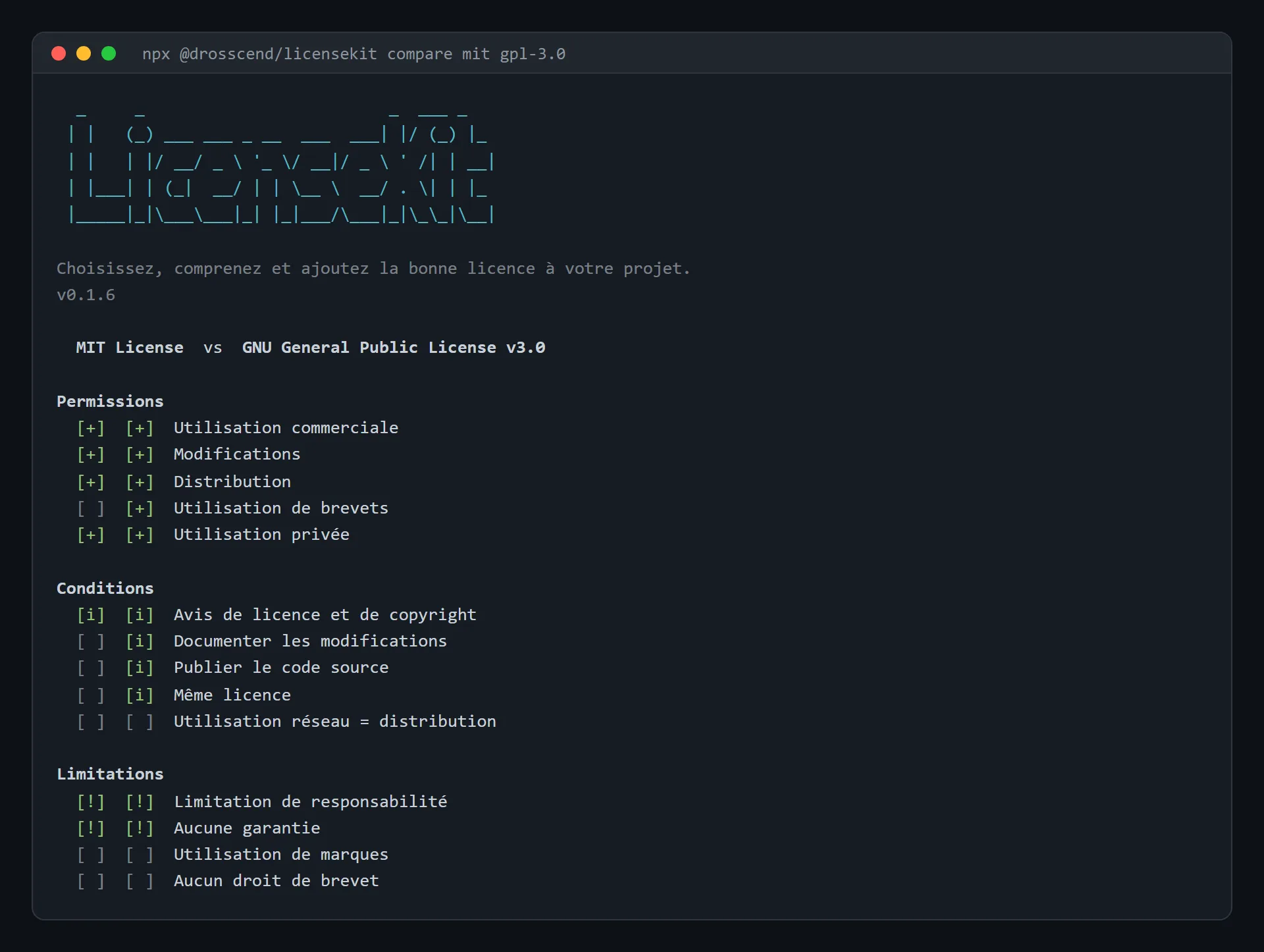
The compare command puts two licences side by side. MIT and GPL-3.0 both allow commercial use, but only the GPL makes you document your changes and redistribute under the same licence.
A wizard that gives my opinion
Run without arguments, the tool switches to guided mode. It asks a few questions about the project (its type, commercial use, copyleft, patents) and shows the best-ranked licences. For the one you pick, it writes the LICENSE file with the current year and the author’s name, which it reads from the Git configuration, then offers to update the license field in package.json.
There’s nothing clever behind the ranking. It’s a points table written by hand, where each answer adds or removes points for certain licences. Answering "a library or framework" favours MIT, Apache and the BSDs, "a commercial product" takes two points off the GPLs, and "documentation" pushes CC0 up.
So it’s really my own convictions turned into points, and I’d rather say so. The tool helps you understand and make a first cut, but it doesn’t replace legal advice.
What’s inside
The licence texts aren’t copied by hand. A script fetches them from the GitHub API, along with their rights and obligations, and stores them in the package, so the tool works offline. Only the grouping by family (permissive, copyleft, weak copyleft, public domain) is done by hand, because GitHub doesn’t provide it.
Beyond that, there are only three dependencies: commander for the arguments, @clack/prompts for the questions and picocolors for the colour. With npx, everything downloads on the first run, before the first question even shows up, so I wanted as few as possible.
My first npm package
I wrote it with Claude Code over two evenings in February. It was my first npm package, and publishing taught me as much as the code.
The name first. license-kit already existed, and npm rejects a new name that only differs from an existing one by punctuation. Hence the package under my name, @drosscend/licensekit.
On the first evening, I published it as soon as it worked. Except it only ran with Bun installed, because its entry file started with #!/usr/bin/env bun. And people who go through npx have Node, not necessarily Bun. The fixed version went out a few minutes later.
The next evening, I wanted publishing to happen on its own. Now pushing a version tag is all it takes, and GitHub Actions publishes the package if the checks pass.
It took me five attempts to get there. With a classic token, npm asked for a two-factor code, which a CI can’t type. So I switched to publishing through OIDC, npm’s trusted publishing. GitHub proves to npm that this repository is the one publishing, and there’s no token left to keep anywhere, so nothing that could leak. I still needed a recent enough npm. With Node 20, it just answered with a 404, and with Node 24, it went through. Since then, every version also carries a provenance attestation, which ties it to the commit it came from.
The repository’s CLAUDE.md walks Claude through the routine: run the checks, bump the version, tag, push. The CI does the rest.
Five months later
In July, I asked Claude for terminal captures for this article. On the comparison one, every limitation was empty, even though each licence at least limits liability and warranty. GitHub calls those limitations liability and warranty, and the code expected no-liability and no-warranty. A licence’s detail sheet went through an alias table, but the comparison had forgotten it. Claude also noticed that --version printed 0.1.1 while npm was at 0.1.3, because the number was written by hand. The capture above is the one from after the fix.
I had both fixed and a 0.1.4 published. Publishing failed, on code that hadn’t moved since February. The CI called TypeScript without its version being declared in the project, so it picked up the latest one. In the meantime TypeScript 7 had come out, and it no longer loads Node’s types on its own. Without them, it no longer knew that process.exit() stops the program, and it saw errors in all the code that relied on it. I had every dependency moved to its latest version, TypeScript 7 included, with Node’s types declared, and 0.1.4 went out.
Where the project stands
It’s published and it works, but I don’t really use it. In October, while checking this article, Claude found two more GitHub tags read the wrong way, and the French had no accents at all. I had it all fixed in 0.1.6. It lives its own life on npm, with around twenty downloads a month.