CronLab
March 2026 → October 20265 min read
It all started with my GitLab to GitHub sync. I wanted it to run every day, on Windows. On Linux, one line in the crontab does it. On Windows, there’s Task Scheduler. It does the job, but its interface is an antique, and you have to go through quite a few windows for a simple command that comes back every day. I figured I might as well make one my own way.
That’s CronLab. You give it a command, the folder to run it in and when: every day at a set time, every X minutes, on certain days of the week, or from a cron expression. It sits in the notification area, runs the command on time, keeps the output of the latest runs and sends a Windows notification at the end. On my machine, one task runs the sync every day and lets me know if it fails. The installer is on the releases page.
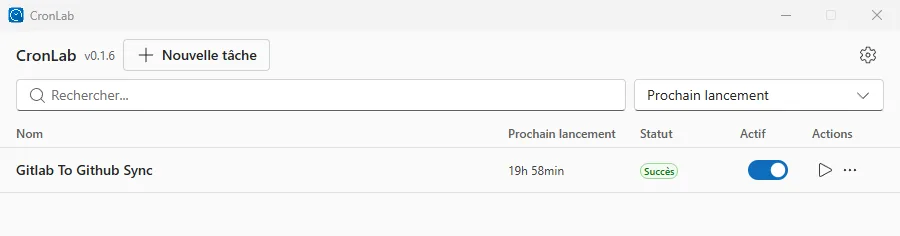
Here’s the task list, with the time left before each one runs next:
Tauri rather than Electron
It’s my first real desktop app. To build one with a web interface, the usual choice is Electron, which ships a full Chromium inside every app. Tauri uses the WebView that already comes with Windows 11 instead. The interface is React, the core is Rust, and the installer is under 4 MB. For a small tool that runs all the time next to the clock, I didn’t want a whole browser sitting in memory. It was also a chance to get my hands on Rust, which I didn’t know.
The interface uses Microsoft’s Fluent UI components so it looks like a real Windows 11 app. It’s in French and English.
The Rust core
On the Rust side, a thread wakes up every thirty seconds, checks which tasks are due and starts them. Each run then gets its own thread, which starts the command without opening a console, waits for it to finish, keeps its output and sends the notification. If the command goes over its time limit, that thread kills the whole process tree with taskkill /T, not just the parent. Otherwise a script that starts other programs would leave them running behind it.
These threads and the interface share the same configuration, behind a Mutex. That’s where Rust gets concrete: without that lock, the program doesn’t compile. In other languages, two threads writing to the same place at the same time gives you a bug that only shows up now and then, at runtime. That one, I never had to chase.
A readable config
Everything lives in ~/.cronlab/, with a config.json for the settings and tasks, and one history file per task in logs/. It’s readable JSON, on purpose. You can edit it by hand or copy it to another PC to get your tasks back. I’d rather have a file I can open myself than a config locked away in an opaque format.
Shipping an app people install
On the web, when I fix a bug, I redeploy and everyone gets the fix. An installed app stays on whatever version was downloaded. So I needed a delivery pipeline and a proper update channel. It’s the part I’m proudest of, because it took the most invisible work.
On every push to main, a first GitHub Actions job checks whether the app’s version already has its release. If it doesn’t, a second job builds the app on Windows, creates the installer, signs the update and publishes the release. In the app, a button in the settings fetches that latest version from GitHub, checks its signature against the public key built into the app, then installs it. If the signature doesn’t match, it rejects the package.
With Claude Code
CronLab is one of the first projects I built with Claude Code. One evening in March, two hours went by between the first commit and the first published version, installer included.
The next day, the core of the program had to be reworked, because tasks never ran at their scheduled time. The scheduler compared the current time with the next run. Except that once the time had passed, the next run was already the following day, so the condition was never true. Now it looks at the slot that just went by, within a five-minute window, and remembers the ones it already started.
At the end of March, I fixed two more gaps. The “Launch at startup” toggle did nothing, because nothing was registered with Windows, and every task opened an empty console window while it ran.
With CronLab, I also started changing a habit. Before, when I was missing a tool, I’d think too bad: I had neither the time nor all the skills to build it. This time, I started making more and more of them, just to save myself time. CronLab and the GitLab sync are the first of that series.
Where the project stands
The latest version, in October, fixes two bugs. Tasks with a cron expression had kept the bug from the start and never ran on their own, and a task that wrote a lot of output stayed stuck until its time limit. The August one already made CronLab start in the notification area without opening its window, and retry the update check, because the connection to GitHub drops often enough for a single attempt to fail.